EXIF capture time: how exhibit.law reads photo metadata
A photo’s filename is not when it was taken. Phones and cameras often write EXIF — especially DateTimeOriginal — into the file itself. That metadata is part of the exhibit’s chain of custody when it is present, and a trap when people confuse “downloaded today” with “captured today.”
exhibit.law reads capture-related metadata during ingest, prefers it over AI guesses when drafting timeline dates, and labels where each date came from so reviewers do not harden an upload minute as a fact.
What EXIF is (in plain terms)
EXIF is a block of tags many still-image formats carry: when the shutter fired, sometimes make and model, sometimes GPS, orientation, and more. Social apps and some exports strip it. Screenshots often have a weaker DateTime (or none). A missing tag is information too — not a license to invent a date.
For litigation, the useful question is usually: did this file record a capture moment we can defend, or are we looking at a copy with no clock left inside?
What exhibit.law captures on upload
After a file lands in a case, extract_metadata runs at the head of the batch chain (before transcription and event drafting). For images — including HEIC when the decoder can open them — the server reads EXIF with Pillow and looks for a capture timestamp in preference order: DateTimeOriginal, then root DateTime (common on iPhone screenshots), then DateTimeDigitized.
When the matching OffsetTime* tag is present, that offset defines the instant. When the phone wrote a wall-clock with no offset, exhibit.law localizes that clock in the case’s display timezone — the same zone the calendar and ICS already use — rather than discarding a usable time or pretending it was UTC.
- Real extracted metadata beats a model-suggested date when drafting events
- Unreadable containers log and return empty metadata — they do not fail the whole chain
- Video and audio use container creation_time (via ffprobe) when it carries a real offset
- PDFs may yield an embedded creation date when the file provides one with an offset
How you see it in Review
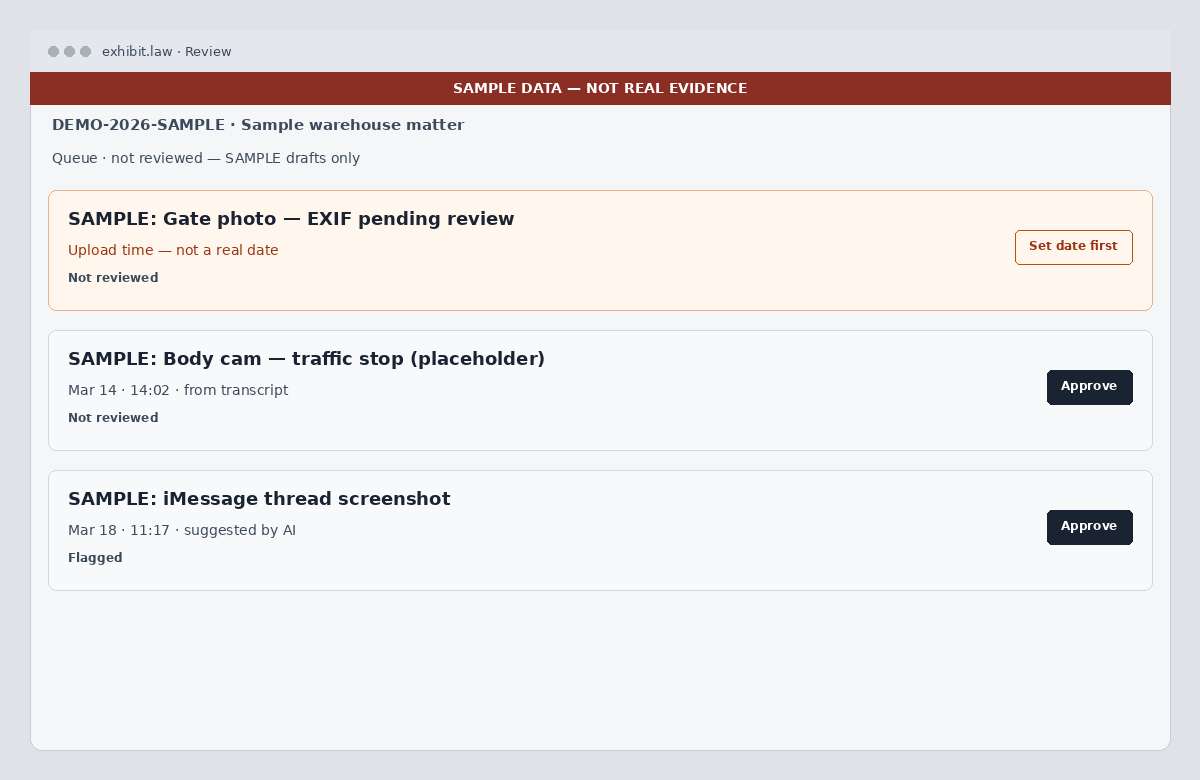
Draft events get an occurred-at source. For images, a date taken from EXIF shows as an “EXIF capture time” provenance chip — separate from title and description chips, because a single card can mix a real camera clock with AI-written prose.
If nothing readable yields a date, occurred_at holds the upload minute and is labeled as a placeholder (not a fact). The calendar hides those by default until someone sets a real moment. Bulk approve will not treat upload-time dates as reviewed until that happens.
Full EXIF, GPS, and authenticity notes
Separately from the timeline draft, file analysis can surface a fuller picture: capture-time highlights, device make/model when present, GPS when the file still carries it, and a tag dump for inspection. That path is independent of transcription — open it from Review next to the source controls when you need to inspect the file, not only the draft card.
Absence of GPS or a stripped EXIF block is reported honestly. Many messenger and social exports never had location tags; that is not the same as “the camera hid the scene.”
Try it with a phone photo
Create a free account, upload a photo that still has EXIF (a direct camera roll export beats a social re-download), process the batch, and open Review — you should see capture-time provenance when the tags are there. Compare with a screenshot or stripped download to see the upload-time warning.
Related: case timeline and chronology, discovery management, legal document OCR, and the Security page for case-scoped storage.