AI case chronology drafting — with human review
Search interest in “AI chronology drafting” usually means one of two things: a tool that invents a court-ready timeline from a dump of files, or a tool that proposes draft events a litigator can verify. exhibit.law is the second kind on purpose.
Drafting runs after the file has been read — transcript text when it exists, EXIF or embedded dates when they are real moments — so a draft is grounded in something readable rather than a filename. Humans still confirm before those drafts harden on the timeline, calendar, and ICS feed.
What “drafting” means here
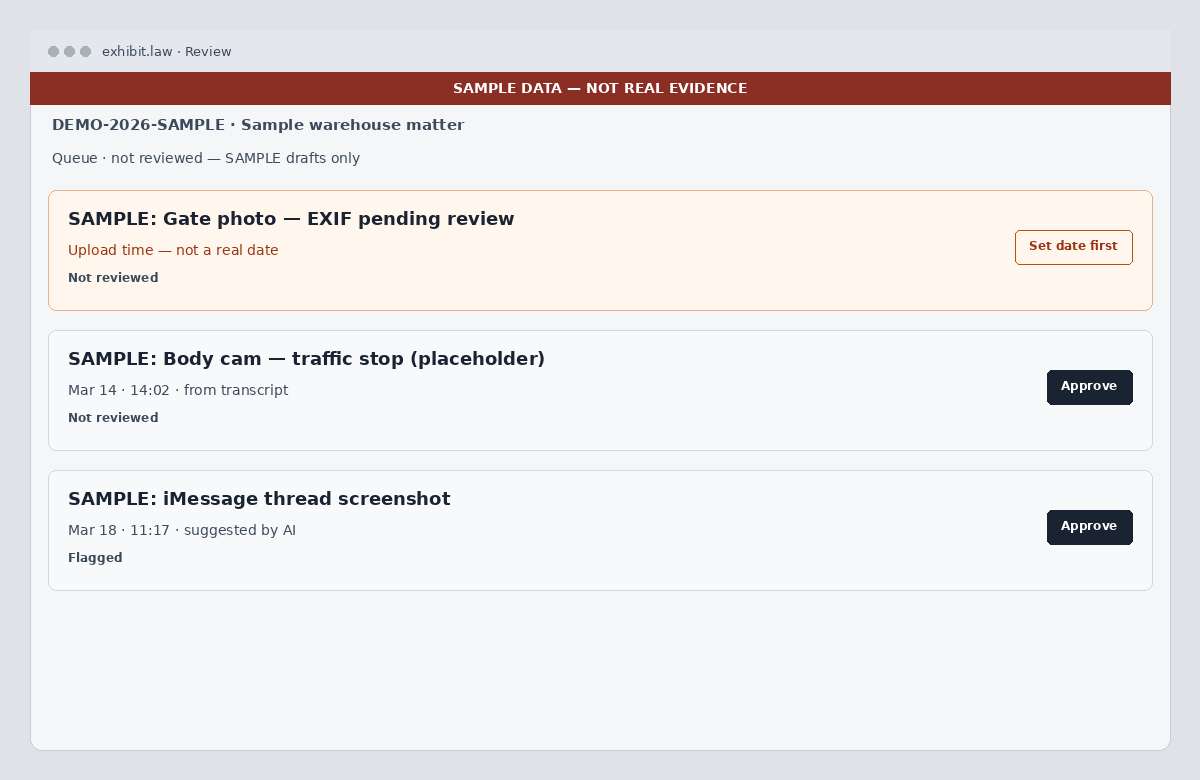
In exhibit.law, an AI draft is a timeline event with review_status not_reviewed: a suggested title, description, and occurred-at, often linked to the media that produced it. It is assistive triage, not a filed pleading and not a declaration that the date is true.
The chain is deliberate: extract metadata → transcribe or OCR by kind → draft_event last. Writing the event before a transcript exists would summarize a filename. Skipping review would convert a model guess into calendar fact.
- Drafts stay not-reviewed until someone confirms them
- Real extracted metadata beats a model-suggested date
- No transcript and no extractable date means no draft — not an upload-minute stamp
- Bulk Approve refuses upload-time placeholders until a person sets a real moment
Provenance per field
A drafted card often mixes a real EXIF capture time with model-written prose. exhibit.law surfaces occurred-at provenance separately from title and description — EXIF, embedded metadata, suggested by AI, or upload time as a warning — so reviewers do not treat storage timestamps as when the thing happened.
Where the drafting runs
Transcription, OCR/vision, and drafting use self-hosted models or third-party providers, depending on the feature and deployment configuration, under applicable no-training terms. If you need a dedicated or self-hosted deployment, contact us to discuss scope, requirements, and fit. Either way, output stays behind human review. Details live on the AI Disclosure page — not in a marketing claim that AI “builds your case.”
Try a small drafting pass
Create a free account, upload a short A/V clip or a PDF with a text layer, process the batch, and open Review. Confirm or fix dates before anything hits the calendar.
Related: how to build a case chronology, case timeline overview, discovery management, and AI Disclosure.